


Best USB-C Fast Charging Cables in 2026: Complete Buyer’s Guide

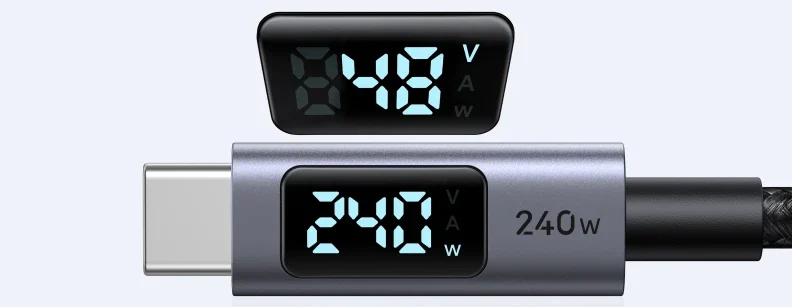
📌 Quick Summary: Not all USB-C cables are created equal. Using the wrong cable can mean the difference between charging your phone overnight or juicing it up in just 20 minutes. In 2026, with USB-C becoming the universal standard for everything from smartphones to laptops, choosing the right fast charging cable is more critical than ever. This guide provides a complete framework for selecting the perfect USB-C cable for your devices. We break down the confusing world of wattage, amperage, and USB standards (USB 2.0 vs. 3.2 vs. USB4). We explain why a cable that fast charges your phone might not even power your laptop, and introduce the game-changing 240W Extended Power Range (EPR) cables. Crucially, we cover how to identify genuine fast charging cables, avoid dangerous counterfeits, and understand the difference between charging speed and data transfer speed. Whether you need a cable for your iPhone 15/16, Samsung Galaxy S26, or MacBook Pro, this guide has you covered.
You just bought a brand new 65W GaN charger, the fastest on the market. You plug in your flagship smartphone, excited to see how quickly it charges, only to find it’s trickle-charging at a snail’s pace. Sound familiar? The culprit is almost certainly your USB-C cable.
In 2026, USB-C has truly become the one port to rule them all. From the latest iPhone 16 Pro Max to the thinnest Ultrabooks, everyone is using USB-C. But this universal connector hides a complex reality: the cable is just as important as the charger. A fast charger is useless without a cable that can handle the power delivery .
This comprehensive guide cuts through the confusion and helps you buy the right cable the first time. We’ll cover:
- Wattage and Amperage Explained: Understanding what the numbers on your charger really mean.
- USB Standards Decoded: USB 2.0, 3.2, USB4—do you need blazing data speeds or just fast charging?
- The 240W EPR Revolution: Future-proofing your setup with Extended Power Range cables for gaming laptops and high-power devices.
- E-Marker Chips: The tiny brain inside every intelligent fast-charging cable and why it matters.
- Safety First: How to spot dangerous counterfeit cables that could damage your devices or even start a fire.
Let’s find the perfect power delivery companion for your devices.
Before You Buy: Check Your Device’s Charging Speed
Your first step isn’t looking at cables—it’s looking at what you’re plugging in. Different devices require different amounts of power to fast charge.
| Device Type | Typical Fast Charging Wattage | Cable Requirement |
|---|---|---|
| Smartphones (e.g., Samsung S26, iPhone 16) | 25W – 45W | 60W-rated cable with E-Marker (more than sufficient) |
| Tablets (e.g., iPad Pro, Samsung Tab S10) | 30W – 45W | 60W-rated cable with E-Marker |
| Ultrabooks & MacBooks (e.g., MacBook Air, Dell XPS 13) | 60W – 100W | 100W-rated cable with E-Marker (minimum) |
| Gaming Laptops & High-Performance Workstations | 100W – 240W | 240W EPR-rated cable with E-Marker |
If you’re unsure about your specific device’s fast charging capabilities, check the manufacturer’s website or the original charger that came with your device. The wattage output printed on that charger tells you what your device is designed to accept.
Understanding USB-C Fast Charging Fundamentals
Before diving into specific cable recommendations, you need to understand three critical concepts: wattage, amperage, and the E-Marker chip.
Wattage (W): The Total Power
Wattage is the total amount of power flowing to your device. It’s calculated by multiplying voltage (V) × amperage (A). Think of it as the total water flow in a pipe. A 100W charger can push more total power than a 20W charger, meaning it can charge compatible devices much faster .
Amperage (A): The Current
Amperage is the rate of electrical flow. USB-C cables are typically rated for specific amperage levels: 3A, 5A, or the new 5A for EPR cables. A standard USB-C cable might only support 3A (60W at 20V), while a high-quality fast charging cable will support 5A (100W at 20V or 240W at 48V) .
The E-Marker Chip: The Cable’s Brain
This is the most important feature to look for in a fast charging cable. An E-Marked (electronically marked) cable contains a small chip that communicates with the charger and device. It tells them:
- “I am a 5A cable capable of handling 100W.”
- “I support USB 3.2 Gen 2 data speeds.”
- “I am a legitimate, safe cable.”
Any cable rated for more than 3A (60W) MUST have an E-Marker chip to comply with USB-C specifications . If you buy a cheap “100W” cable without an E-Marker, it’s either lying about its capabilities or potentially dangerous.
⚠️ Critical Safety Note: Always verify that high-wattage cables (60W+) are E-Marked. Non-compliant cables can overheat, melt, or even cause fires when pushed beyond their actual limits .
USB Standards: Charging vs. Data Transfer Speed
Here’s where many buyers get confused. A cable’s ability to fast charge has almost nothing to do with its data transfer speed. You can have a 240W charging cable that only transfers data at USB 2.0 speeds (480Mbps), and a 60W cable that transfers at 40Gbps (USB4).
| USB Standard | Max Data Speed | Ideal For |
|---|---|---|
| USB 2.0 | 480 Mbps | Pure charging cables, mice, keyboards. Inexpensive. |
| USB 3.2 Gen 1 | 5 Gbps | External SSDs, quick file transfers. |
| USB 3.2 Gen 2 | 10 Gbps | Fast external storage, video editing from external drives. |
| USB4 / Thunderbolt 4 | 40 Gbps | High-resolution video (multiple 4K displays), eGPUs, professional workflows. |
Pro tip: For bedside charging, car charging, or general use, a USB 2.0 100W E-Marked cable is often the best value. You get full fast charging capability without paying for data speeds you’ll never use.
The 240W EPR Revolution: Future-Proof Your Setup
2024 and 2025 saw the widespread adoption of the USB-C Power Delivery 3.1 standard, bringing Extended Power Range (EPR) to the market. In 2026, 240W charging is becoming the new standard for high-performance devices .
What is EPR?
Previous USB-C PD 3.0 topped out at 100W (20V @ 5A). EPR increases the voltage to 48V while maintaining 5A, achieving a maximum of 240W (48V × 5A) . This opens up USB-C charging to:
- Gaming laptops that previously required proprietary barrel connectors
- High-end workstations
- Large monitors and displays
- Power tools and other high-drain devices
Do You Need 240W?
For most users, 100W is still more than enough. An iPhone 16 or Samsung Galaxy S26 will never draw 240W—they’re physically incapable of it. However, if you own a 16-inch MacBook Pro, a Dell XPS 17, or any gaming laptop that supports USB-C charging, a 240W EPR cable provides:
- Headroom: The cable runs cooler and more efficiently even at lower wattages.
- Future-proofing: Your next laptop will almost certainly support higher wattages.
- Universal compatibility: One cable for everything from your phone to your gaming rig.
✅ EPR cables are backwards compatible with all older USB-C devices. They will safely negotiate lower power levels with phones and tablets, so buying a 240W cable won’t harm your smaller devices—it just gives you extra capability.
How to Spot a Genuine Fast Charging Cable
The market is flooded with counterfeit and mislabeled cables. Here’s how to ensure you’re getting what you pay for:
1. Check the Packaging for E-Marker Certification
Legitimate 100W or 240W cables will explicitly mention “E-Marked” or “56kΩ resistor” (for 60W cables) on the packaging. If it says “100W” but doesn’t mention an E-Marker chip, be skeptical .
2. Inspect the USB-C Plug
On genuine E-Marked cables, you can sometimes see a small circuit board inside the USB-C plug. Counterfeit cables often have a solid plastic mold with no visible circuitry.
3. Buy from Reputable Brands and Sellers
Stick to established brands like Anker, Belkin, UGREEN, and reputable retailers like buythisglobal.co.uk. Amazon Marketplace and eBay are filled with uncertified cables that claim specifications they cannot deliver .
4. Test the Cable
If you have a USB power meter, you can verify the cable’s capabilities. A genuine 100W cable will allow your laptop to draw its full charging wattage; a fake one will throttle at 60W or 45W.
Cable Length: Does It Matter for Fast Charging?
Yes, length affects charging speed. Longer cables have more electrical resistance, which can lead to voltage drop and slower charging.
- 0.5m – 1m (1.6ft – 3.3ft): Ideal for maximum charging speed. Minimal resistance means your device gets all the power your charger can deliver.
- 1.8m – 2m (6ft – 6.6ft): The most popular length for bedside tables and sofas. Good quality cables maintain full 100W speeds at this length.
- 3m (10ft) and longer: Convenient but can suffer from voltage drop. For 100W charging, look for thicker gauge wires (lower AWG number, like 20AWG) to maintain performance .
Pro tip: If you need a very long cable for high-wattage charging, look for one specifically rated for that length. A standard 3m cable might only deliver 60W reliably, even if it’s E-Marked.
Durability Features: What to Look For
A fast charging cable is useless if it frays and breaks after three months. Look for these durability indicators:
- Braided Nylon Exterior: Significantly more durable than standard rubber or PVC casing. Resists tangling and fraying.
- Reinforced Strain Relief: Thick, flexible joints where the cable meets the connector prevent breakage from bending.
- Laser-Welded Connectors: Ensures the metal housing doesn’t separate from the plug.
- Kevlar Reinforcement: Some premium cables include Kevlar fibers internally for exceptional strength.
Best USB-C Fast Charging Cables in 2026 by Category
Best Overall: 100W USB-C to USB-C Braided Cable (E-Marked)
The sweet spot for 95% of users. These cables deliver full 100W charging for laptops, tablets, and phones, feature durable braided construction, and often support USB 2.0 data speeds to keep costs reasonable. Perfect for: Daily carry, home charging stations, office use.
Best for Power Users: 240W EPR USB-C Cable
For those with gaming laptops, multiple high-power devices, or a desire to future-proof. These cables support the new 240W standard and are typically built with premium materials. Perfect for: 16-inch MacBook Pro users, gaming laptop owners, tech enthusiasts.
Best for Data + Charging: USB4 / Thunderbolt 4 Cable
When you need both 100W charging and 40Gbps data transfer. These are the most expensive cables but essential for connecting high-resolution monitors, external GPUs, or ultrafast SSDs. Perfect for: Creative professionals, video editors, dual-monitor setups.
Best Multi-Pack: 3-Pack 100W USB-C Cables (Various Lengths)
The best value for households with multiple devices. Get a 1m cable for your power bank, a 2m for the bedroom, and a 0.5m for the car. Perfect for: Families, households with diverse charging needs.
USB-C Fast Charging Cable Decision Tree
FIND YOUR PERFECT USB-C CABLE
- ↓ What devices will you charge?
- ├── Only phones, earbuds, tablets → 60W cable (3A, may not need E-Marker)
- └── Laptops or future-proofing → Continue ↓
- ↓ Do you need high-speed data transfer (over 480Mbps)?
- ├── NO (charging only) → 100W or 240W USB 2.0 E-Marked cable
- └── YES → Continue ↓
- ↓ What’s your data speed requirement?
- ├── External SSD (up to 10Gbps) → USB 3.2 Gen 2 cable (10Gbps, 100W)
- └── 4K monitors / eGPU (40Gbps) → USB4 / Thunderbolt 4 cable (40Gbps, 100W)
- ↓ Do you own a high-power gaming laptop or workstation?
- ├── YES → 240W EPR cable (for maximum power headroom)
- └── NO → 100W cable is sufficient
Frequently Asked Questions (FAQs)
1. Can I use a 240W cable with my phone that only charges at 25W?
Yes, absolutely. USB-C Power Delivery is a smart negotiation protocol. The phone, charger, and cable communicate to determine the safest and fastest charging speed. A 240W cable will simply tell your phone “I can handle up to 240W,” and the phone will reply “I only need 25W,” and they’ll settle on 25W. It’s completely safe and actually provides headroom for future devices .
2. Why is my phone charging slowly even with a “fast charging” cable?
There are several potential culprits: Your charger may not be powerful enough (e.g., using a 15W charger with a 100W cable), your cable may be too long (causing voltage drop), or your cable may be counterfeit and not actually capable of the claimed speeds. First, test with the original cable that came with your device. If that works, your new cable is the problem .
3. What’s the difference between USB-C and Thunderbolt cables?
All Thunderbolt 3/4 cables are USB-C cables, but not all USB-C cables are Thunderbolt cables. Thunderbolt cables support much higher data speeds (40Gbps) and additional protocols for connecting multiple high-resolution displays and external GPUs. For charging only, a standard USB-C cable is perfectly fine and much more affordable .
4. Is it safe to leave fast charging cables plugged in all the time?
Yes, it’s perfectly safe. Modern cables and chargers are designed to be left plugged in. The cable itself doesn’t draw power unless it’s connected to a device. However, for safety and energy savings, you may want to unplug the charger (not the cable) if you’re going away for an extended period.
5. How do I know if my cable has an E-Marker chip?
Check the product description for “E-Marked,” “56kΩ resistor,” or “5A capability.” If you already own the cable, you can connect it between a USB power meter and your device. A genuine E-Marked cable will identify itself to the meter. Alternatively, connect it to a laptop—if the laptop recognizes it as a 100W-capable charger, it’s likely E-Marked .
6. Can a bad USB-C cable damage my device?
Yes, absolutely. Poorly manufactured or counterfeit cables can cause overheating, voltage spikes, and even fires. They may lack the proper internal wiring or use substandard materials that can’t handle the current. This is why buying from reputable sources is crucial .
7. Do I need a special cable for iPhone 15/16 fast charging?
The iPhone 15 and 16 series use standard USB-C Power Delivery. Any quality 60W or 100W USB-C to USB-C cable with an E-Marker will enable full fast charging speeds (around 30W for the Pro Max models). You don’t need an Apple-specific cable, but ensure it’s from a trusted brand .
Conclusion: Your USB-C Fast Charging Cable Checklist
Buying the right USB-C fast charging cable doesn’t have to be complicated. Focus on your actual needs, ignore marketing hype, and always prioritize safety and certification over bargain prices.
Your USB-C cable buying checklist:
- ☐ Check your device’s maximum charging wattage (phone, tablet, or laptop).
- ☐ Decide if you need data transfer (USB 2.0 is fine for most users).
- ☐ Choose wattage: 60W (phones/tablets), 100W (most laptops), or 240W (gaming/workstations).
- ☐ Verify E-Marker certification for any cable over 60W.
- ☐ Select appropriate length (shorter = faster, longer = more convenient).
- ☐ Look for durability features (braided nylon, reinforced strain relief).
- ☐ Buy from reputable brands and retailers to avoid dangerous counterfeits.
With the right USB-C fast charging cable, you’ll unlock the true speed of your chargers and keep all your devices powered up and ready to go. Explore our curated selection of certified, high-performance USB-C cables at buythisglobal.co.uk and never suffer from slow charging again.
Additional Resources
For more information on USB-C standards and safety, check these external resources:
- USB-IF Official Power Delivery Specification – The official standards body for USB technology.
- AnandTech: USB-C 240W PD 3.1 Explained – In-depth technical analysis of the EPR standard.
- Benson Leung’s Google+ Archive (via Archive.org) – The original source for USB-C cable reviews and safety testing.
This article is for informational purposes only. The author and platform assume no responsibility for device damage, data loss, or safety incidents resulting from the purchase or use of any cables mentioned. Always verify compatibility with your specific devices and purchase from authorized retailers. The information presented here is current as of March 2026 and reflects the latest USB-C Power Delivery standards and market offerings.
The difference between a frustratingly slow charge and lightning-fast power isn’t magic—it’s the 5A E-Marked cable you didn’t know you needed.